6 min read
Configure Shul Settings
This Help Center article offers a clear and comprehensive guide to all the options available in the Settings>Edit Settings menu. Each section is designed to help tailor settings to meet the unique needs of each synagogue. To jump directly to a specific section, click on any of the section titles listed below:
| Setting | Configuration |
|---|---|
| 1. Shul & Location Details |
|
| 2. Security |
The security settings include options:
|
| 3. Accounts & People |
|
| 4. Default Title Salutation |
If no salutation is set in a profile, this will override the empty salutation and add a default. |
| 5. Member Directory |
Controls all configuration options for the member directory. The admin version remains accessible in Admin. |
| 6. Dedications & Honorees |
Manage dedications and honorees, including options for visibility, email notifications, and report formatting. |
| 7. Gabbai Options |
Manage Gabbai options, including selections:
|
| 8. Zman & Religious Options |
|
| 9. Lifecycles |
|
| 10. CMS Pages |
If utilizing ShulCloud's website template, determine what sidebar type for website. |
| 11. Events |
If applicable, show Events in widgets. |
|
|
NOTE: Audio Libraries cannot handle files larger than 80mb. Best Practice: Utilize third party storage for audio & video files. The third-party storage will include a universal player for the audio (and video) that can then be embedded into ShulCloud site. |
| 13. Calendar |
|
| 14. Transactions |
|
| 15. Payments & Donations |
|
| 16. Credit Card Display |
Set Credit Card Display option for saved credit cards on member's accounts. |
| 17. Deposit Page |
Set charge type for deposit fee. |
|
|
| 19. Statement Options |
|
| 20. Tax Mode |
If applicable: toggle on CRA Mode (for Canadian shuls) or enable Gift Aid (UK shuls). |
| 21. Tax Statements |
|
| 22. Receipts | Modify receipt preferences for transactions and donations. |
| 23. Other Site Options |
ShulCloud templates are already mobile responsive. NOTE: Support activation required:
|
| 24. Site Sponsor |
Optional links and messages for mobile app sponsors. |
| 25. Social Network Integration |
If applicable, set the ShulCloud site to the synagogue’s Facebook page using a Facebook App ID and Secret, which are created through Facebook's developer tools. |
|
NO LONGER SUPPORTED |
|
| 27. Carddav Address Book Settings | Allows admins to customize how contacts are organized. Includes options to filter to specific fields for synchronization. |
1. Shul & Location Details
| Setting | Description |
|---|---|
| Name | How the name is listed throughout the site. |
| Address | Used to generate coordinates for zmanim, calendar list widgets, and inserted into statements and emails. |
| Coordinates | Sets the physical location of the shul to ensure zmanim are accurate. |
| Appears on statements and is the default sender for login links, statements, and mailings. | |
| Tax-ID | Can be included on statements by default. |
2. Security
| Settings | Description |
|---|---|
| Require users to set a password on first login | Requires users to create a password during their first login before accessing the site. |
| Login Links | Sets an expiration time for login links, after which they become inactive. |
| Timeout Sessions | Select time in minutes until people are automatically logged out users after a set period of inactivity. Applies to both admin and regular user accounts. |
3. Accounts & People Options
| Settings | Description |
|---|---|
| Require users to set a password on first login | Requires users to create a password during their first login before accessing the site. |
| Browser Verification | Sends an email verification if the login attempt is from an unrecognized browser. |
| Login Links | Sets an expiration time limit for login links, after which they become expired. |
| Timeout Sessions | Logs users out after a set period of inactivity. Applies to both admin and regular user accounts. |
4. Default Title Salutation
NOTE: If no salutation is set in a profile, this will override the empty salutation and add a default.
5. Member Directory
| Setting | Description |
|---|---|
| Show Directory | Turn on the directory for logged in users. |
| Accounts Listed | The account types that will display in the directory. |
| Visible To | The account types and tags that can view the directory. |
| Show Account Type and Join Date | Toggle on/off info and limit it to people with only certain tags. |
| Allow people to export | If applicable, allows all or only certain account types and tags to export the directory. |
| Allow pictures | Each family would be able to upload one picture for their account. |
| Default Directory Views | As the admin, set the default view people see in the public and admin directories. |
| Primary/Secondary Address Type |
Can display one or more addresses on the top of each account. |
Directory Defaults
| Settings | Description |
|---|---|
| Never | This item will not show by default, and users cannot change it to be displayed. |
| Apply now to existing | This will override any changes anyone has made and set that option to Yes, No, or Never. |
NOTE: For intentional consent, 'Yes' should not be set as the default option when sharing child photos.
6. Dedications & Honorees
| Setting | Description |
|---|---|
| Field Template to use for Donors in Dedication Report | Select specific Field Templates from My Lists. (Naming convention: Mr. & Mrs.) |
| Send New Dedications to Emails |
|
7. Gabbai Options
8. Zman & Religious Options
| Setting | Description |
| Nusach/Custom |
Options to select one from dropdown:
|
NOTE: Please consult Rabbi before making any changes to these settings.
9. Lifecycles
| Settings | Description |
|---|---|
| Visible For |
Which account types will have their lifecycles displayed. |
| Admins See |
Can override the options choose to see all lifecycle types, only those selected above, or only their own. |
| Account Types selected see |
When account types are selected, this will set which lifecycle events they will see. |
| Everyone else sees |
Will set what people who are not an admin or one of those selected account types will see. |
| Yahrzeit English Observance |
Can allow yahrzeits to be observed on the English date of death rather than the default Hebrew date. |
| Yahrzeit Adar Observance on a Leap Year |
If a yahrzeit is set to take place in Adar I or Adar II in a leap year, it will take place that month. However, if it is set as only Adar, the shul must set if it should take place in Adar I (default), Adar II, or both months. This setting can be overridden on a specific yahrzeit. |
| 30 Adar I Observance on a non-leap Year |
By default, a yahrzeit falling on 30 Adar I in a non-leap year will be observed on 30 Shevat. Optionally, this can be set to be observed on 1 Nissan. This setting can be overridden on a specific yahrzeit. |
10. CMS Pages
| Settings | Description |
|---|---|
| New Page - Sidebar Type |
NOTE: Not all ShulCloud templates feature sidebars in their homepage design. For which templates have sidebars refer to Choose a Website Template. |
11. Events
| Settings | Description |
|---|---|
| Show Events on Widget | When creating a new event, this option sets whether “show on widgets” is selected by default. |
| When Admin Registers | Option to disable sending emails to the member when registration is done by an admin. |
12. Audio Libraries
| Settings | Description |
|---|---|
| Best Practice | Use third-party storage for audio (and video) files. Third party storage includes a universal audio player that can then be embedded into the ShulCloud site directly. |
13. Calendar
| Settings | Description |
|---|---|
| Fill Up Page | Adjusts calendar layout to stretch or shrink to fit one page. |
| Calendar Colors | If using custom calendars, sets how the custom color appears in event names. |
| Wrap/Trim Event Text |
Chooses how long event names are display:
|
| Holidays Shown | Select which holidays are displayed on the calendar. |
| Include Minyanim on Minyan Finder | Adds Schedule Rule minyans to the ShulCloud Minyan Finder. |
14. Transactions
| Settings | Description |
|---|---|
| Transaction Add Emails | Choose default behavior for sending emails: check, uncheck, or collapse the communications section. |
| Days to Show on Site Transactions | Default number of days to display site transactions (e.g., 30; max 365). |
| Days to Show on Account Transactions | Default number of days to display account transactions (e.g., 1000). |
15. Payments and Donations Page
| Setting | Description |
|---|---|
| Surcharges | Applies only to Shulware Integrated Payments, not third-party processors. |
| Allow payments from | Open Payment only when unapplied or prepayment type matches change type. |
| Non Logged In People Can Donate | Allow donations from non-logged-in users. |
| Allow Donations on the payment screen | Enable donations on the payment screen. |
| Time of day for Recurring Payments | Set time for recurring payments (e.g., 6:00 PM). |
| Order to Allocate Split Payments | Choose allocation method: Split proportionally or close oldest items first. |
| Allow Payment start date, number of months ahead | Set how far in advance payments can start. |
| Allow Payments to start on certain days | Specify allowed start days (e.g., "1,15"). |
| Default Setting for Optional Fees | Choose to include or exclude optional fees by default. |
16. Credit Card Display
| Settings | Description |
|---|---|
|
Allow Plaid |
Note: The Plaid setting is hidden by default. The 'Allow Plaid' option appears only after a payment gateway has been added to the site. |
17. Deposit Page
| Settings | Description |
|---|---|
| Only Show Payments Dated After |
Filters payments to show only those dated after the specified date (e.g., 1/1/2025). |
| Deposit Fee Charge Type |
Select the charge type for deposit fees. |
18. Other Financial Options
| Settings | Description |
| Fiscal Year Start Date | Enter the fiscal year start date for the organization. (e.g. January 1 or July 1). |
| Processing Fee Donation Charge Type | Select a charge type specifically for processing fee donation charge type. |
19. General Statement Options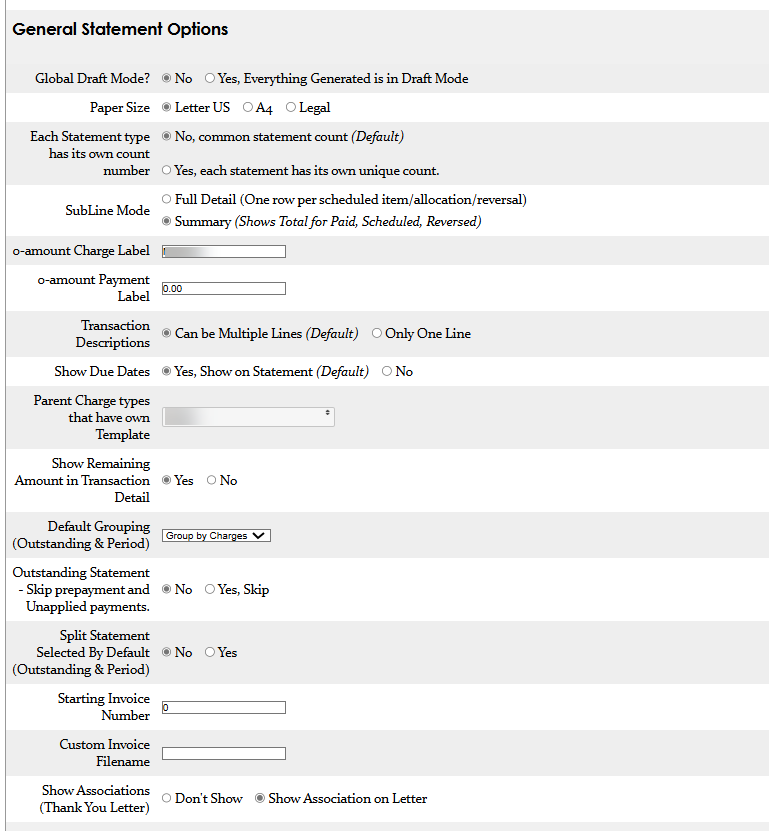
20. Tax Mode
| Settings | Description |
|---|---|
| Special Tax Mode: CAN - CRA Mode | Canadian shuls enable CAN - CRA Mode. |
|
Special Tax Mode: GBR - Gift Aid |
UK shuls enable GBR - Gift Aid. |
21. Tax Statements
| Settings | Description |
|---|---|
|
Each Line
|
Displays either each individual payment or a summary by charge type. Note: If using Charge Type Summary, only “Show Only Tax Deductible” can be selected. |
|
Show Tax Deductible Components |
Shows a column for either just the tax-deductible amount or both deductible and non-deductible amounts. Note: If showing both deductible and non-deductible, “Individual Payments” must be selected for Each Line. |
22. Receipts
23. Template & Other Site Options
| Settings | Description |
|---|---|
| Mobile Announcement Emails |
Allows quick email announcements from mobile device by sending to By default, this feature is blocked. Email questions@shulcloud.com to enable this feature. |
| Google Analytics | Enables traffic tracking through Google Analytics. |
| Force all mobile announcement emails to come from | Select email address. If applicable. |
| Admin Menu Quick Search | Controls whether search results open in a new tab or the same window when using the quick find field. |
| New Mail, Auto Load Recipients | If set to Yes, mailing lists auto-load recipients for Legacy mail. If set to No, starts with an empty list. |
24. Site Sponsor
25. Social Network Integration
26. Hineynu - No Longer Supported
27. Carddav Address Book Settings
| Setting | Description |
|---|---|
| Carddav Address Book |
NOTE: By default, Carddav settings are hidden. Select Yes to display Carddav options. |
| Account Filtering |
|